
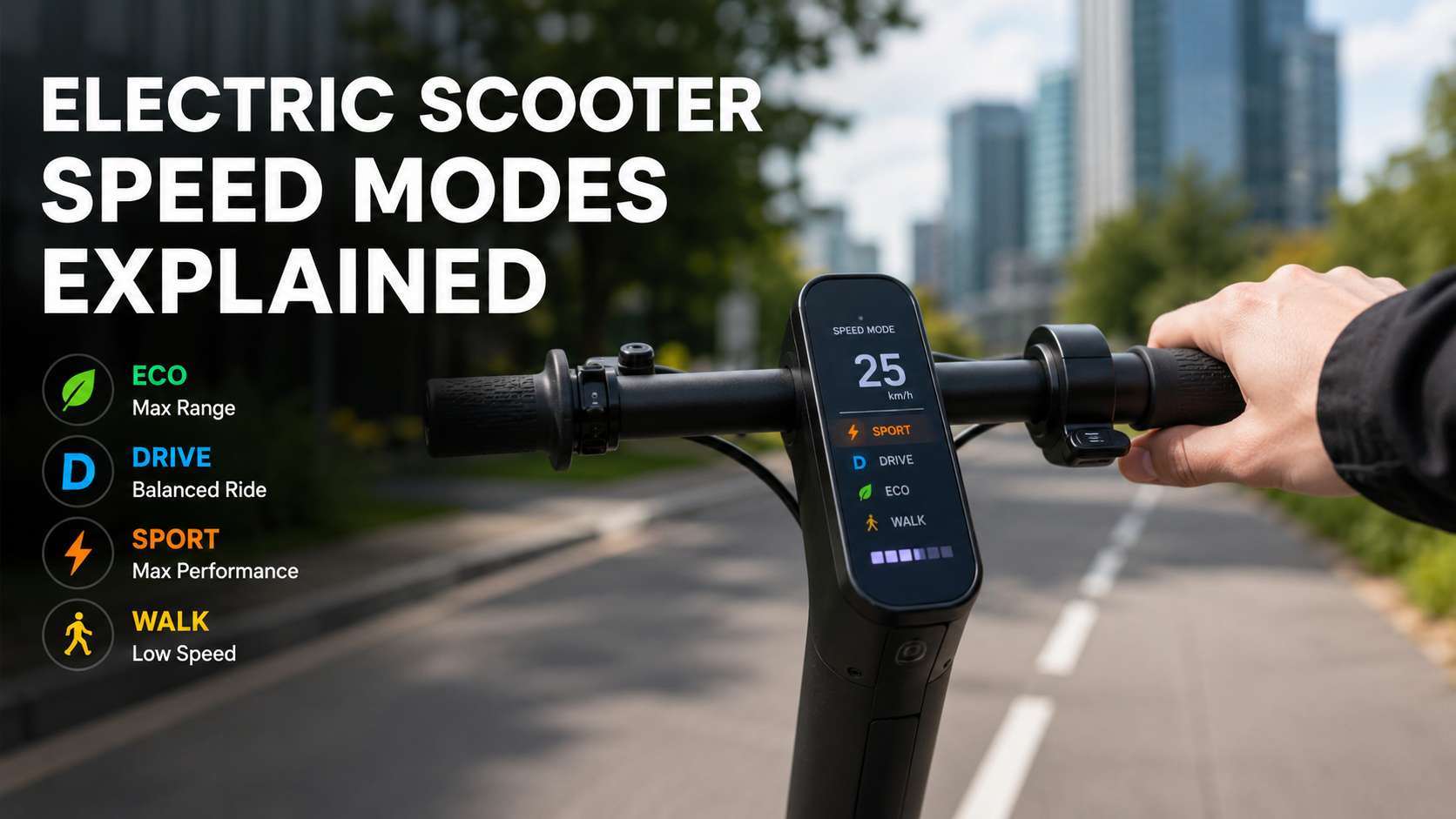
Electric scooter speed modes look simple on the display, but they change much more than speed. They affect acceleration, battery range, hill climbing, braking feel, comfort, and rider control. So, choosing the right mode can make your scooter feel safer, smoother, and more practical.
Most electric scooters come with several riding modes. The names change from one brand to another, yet the idea stays very similar. Eco mode saves battery. Drive or Standard mode gives a balanced ride. Sport mode gives faster acceleration and higher speed. Walk or Pedestrian mode keeps the scooter very slow for crowded areas.
That sounds basic, but real-world riding adds more detail. A mode that feels perfect on a flat bike lane may feel weak on a hill. A fast mode that feels fun on open pavement may feel too sharp in traffic. For this reason, knowing how each setting works helps you ride with more confidence.
What Are Electric Scooter Speed Modes?
Electric scooter speed modes are preset riding profiles. Each mode tells the scooter how much power to send to the motor. It can limit top speed, soften throttle response, reduce acceleration, or give stronger power delivery.
Most scooters include some of these modes:
- Walk mode or Pedestrian mode
- Eco mode
- Drive mode, Standard mode, or Normal mode
- Sport mode
- Custom mode through an app
- Turbo, Boost, or Ludo mode on some high-performance scooters
The scooter does not change its motor, battery, or wheels. Instead, the controller changes how the scooter behaves. That is why the same scooter can feel calm in Eco mode and much sharper in Sport mode.
In practice, the right mode depends on the road, battery level, rider weight, weather, and local speed rules. A new rider should not treat Sport mode as the default. A confident rider should not ignore Eco mode either, as it can save range and make busy areas easier to handle.
Walk Mode or Pedestrian Mode
Walk mode is the slowest setting on most electric scooters. It is made for places where normal riding speed feels unsafe or rude. Think about shop entrances, crowded sidewalks, apartment courtyards, train stations, tight parking areas, and shared spaces.
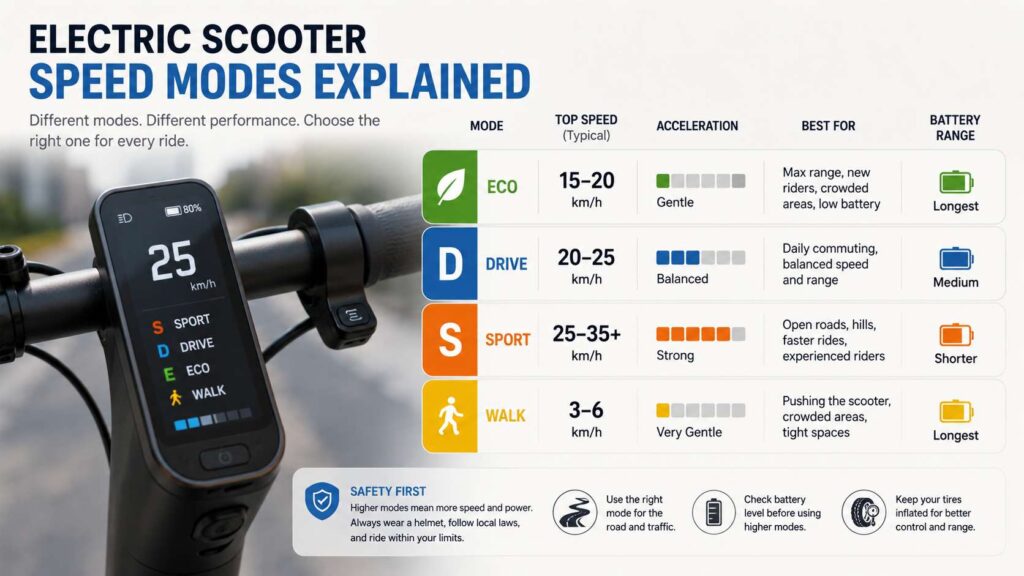
Many scooters limit Walk mode to around 3 to 6 km/h. That speed is close to walking pace, so it helps when you push the scooter beside you. On heavier scooters, this small motor assist can make a big difference.
Walk mode works best for:
- Crowded public areas
- Narrow entrances
- Shared paths with many people
- Pushing the scooter uphill
- Moving through parking lots
- Slow control near buildings
Here is the honest part: Walk mode is not exciting, but it is very useful. Many riders ignore it at first, then start using it once they deal with crowds, stairs, gates, and tight indoor spaces.
Still, Walk mode is not risk-free. The scooter can move forward when the throttle is pressed. Keep both hands on the handlebar, especially near children, pets, and people who are not paying attention.
Eco Mode
Eco mode is the best setting for range and smooth control. It reduces power delivery, lowers top speed on many scooters, and makes acceleration softer. So, it is ideal for beginners and for riders who want to stretch battery life.
Eco mode works well for:
- New riders
- Long commutes
- Low battery rides
- Busy bike lanes
- Wet pavement
- City centers
- Relaxed weekend rides
The biggest benefit is battery range. Lower speed uses less energy. Softer acceleration reduces battery strain too. That matters a lot on routes with many stops, crossings, and traffic lights.
Eco mode also helps with control. The scooter reacts more gently, so small throttle mistakes feel less dramatic. That is helpful for riders who are still learning balance, braking, and turning.
But Eco mode has limits. It can feel weak on hills. It can also feel too slow in traffic where cyclists and other scooter riders move faster. In that case, Drive mode may feel safer, as it lets you keep a steadier pace without jumping straight to Sport mode.
Drive Mode, Standard Mode, or Normal Mode
Drive mode is the everyday setting on most scooters. Some brands call it Standard mode or Normal mode. The name changes, but the purpose stays the same. It gives a balance between speed, range, and control.
For many riders, this is the best mode for daily use. Eco mode may feel too soft after a few days. Sport mode may feel too sharp in traffic. Drive mode usually sits in the middle, which makes it easy to live with.
Use Drive mode for:
- Daily commuting
- Medium-distance rides
- Normal bike lanes
- Light hills
- Mixed road surfaces
- Regular city traffic
- Riding with a comfortable safety margin
Drive mode is also a good learning step after Eco mode. Once you feel stable and confident, it gives you more speed without making the scooter feel too aggressive.
My real opinion: Drive mode is the mode most riders should use most of the time. It feels normal, predictable, and calm enough for daily trips. Sport mode is fun, but Drive mode is usually smarter.
Sport Mode
Sport mode gives the strongest performance on most commuter scooters. It usually unlocks the highest top speed, sharper acceleration, and stronger hill climbing. As a result, the scooter feels more responsive and more powerful.
Sport mode works best for:
- Open roads
- Clear bike lanes
- Hill climbs
- Experienced riders
- Shorter trips
- Dry pavement
- Routes with fewer stops
Sport mode can make a scooter feel much more capable. It helps when you need to climb a hill or keep pace on a clear stretch of road. It can also help heavier riders maintain speed, as long as the scooter is rated for that load.
Still, Sport mode has real drawbacks. Battery drains faster. The throttle can feel more sudden. Braking distance increases as speed rises. Small wheels also react badly to potholes, wet leaves, gravel, and broken pavement.
So, Sport mode should not be the default in every situation. It works best when the road is open, the surface is clean, and the rider has enough experience to react quickly.
Custom Mode and App Settings
Some electric scooters let you change performance settings through a companion app. This can give you more control than fixed Eco, Drive, and Sport modes.
Custom settings can include:
- Maximum speed
- Acceleration strength
- Regenerative braking level
- Start mode
- Cruise control
- Motor response
- Single or dual motor settings on some scooters
Custom mode is useful for riders who want a specific feel. For example, you may want a higher top speed with softer acceleration. Or you may want stronger regenerative braking for city riding. Some riders use custom settings to create a safer profile for a family member.
At the same time, app settings can become annoying. Some scooter apps feel slow. Bluetooth may fail. Firmware updates can change behavior. For this reason, a scooter should still feel easy to use from the display alone.
Turbo, Boost, and Ludo Modes
Some performance scooters include extra high-power modes. These may be called Turbo, Boost, Ludo, or another brand-specific name. They are common on faster dual-motor scooters, not basic commuter models.
These modes give stronger acceleration and higher performance. That sounds fun, and it can be. Yet they also demand more skill, better braking, and better safety gear.
Use high-power modes only when:
- The road is clear
- The pavement is dry
- You have enough space
- You know how the scooter reacts
- Your brakes and tires are in good condition
- Local rules allow that speed
Fast scooters can feel closer to small electric mopeds than basic kick scooters. For riders interested in larger scooter-style machines and urban mobility news, the new 2026 Aprilia SR GT 400 shows how the scooter category keeps expanding beyond simple short-distance commuting.
How Speed Modes Affect Battery Range
Speed modes have a huge effect on battery range. Eco mode usually gives the longest range. Drive mode gives a better balance. Sport mode drains the battery faster. Turbo or Boost modes drain it even faster.
There are several reasons for this:
- Higher speed creates more air resistance
- Hard acceleration pulls more current from the battery
- Hill climbing needs extra power
- Heavy riders use more energy
- Cold weather reduces battery performance
- Low tire pressure increases rolling resistance
A scooter advertised with a long range may not reach that number in Sport mode. Real range depends on speed, rider weight, terrain, wind, temperature, tire pressure, and stop-and-go riding.
For better range, use Eco or Drive mode. Keep tire pressure correct. Avoid full-throttle starts. Slow down a little before hills, then keep a steady pace. These small habits can add useful extra distance.
How Speed Modes Affect Safety
Speed modes affect safety in two main ways. They change how fast you travel, and they change how quickly the scooter responds.
Eco mode gives you more time to react. Drive mode feels safe for most normal routes. Sport mode needs more attention, more space, and better braking habits.
The faster you ride, the longer it takes to stop. That matters more on electric scooters, as small wheels do not handle road defects as well as larger motorcycle or bicycle wheels. A pothole that feels small at low speed can become a serious problem at high speed.
Use the slowest mode that still fits the route. That does not mean you should crawl everywhere. It means the mode should match the road, traffic, weather, and your skill level.
Best Speed Mode for Beginners
Beginners should start with Eco mode. It keeps acceleration gentle and makes the scooter easier to control. Walk mode is useful for learning throttle feel, but it is too slow for real riding practice.
A good beginner routine looks like this:
- Start in Eco mode
- Practice braking before speed
- Learn gentle throttle control
- Turn slowly at first
- Move to Drive mode after a few rides
- Save Sport mode for later
New riders often press the throttle too hard from a stop. They also hold the handlebar too tightly. Eco mode reduces both problems, as the scooter feels calmer.
Confidence should come before speed. Once braking and turning feel natural, Drive mode becomes a good next step.
Best Speed Mode for Commuting
Drive mode is usually the best mode for commuting. It gives enough speed for city travel, but it does not drain the battery as quickly as Sport mode.
A smart commuting pattern looks like this:
- Use Eco mode in crowded areas
- Use Drive mode for most of the route
- Use Sport mode for hills or clear open sections
- Return to Drive mode before crossings and traffic
- Use Walk mode near buildings and pedestrians
This habit makes riding smoother. It also helps you manage battery range better.
For riders comparing electric scooters with larger urban scooters, the Aprilia SR GT 400 urban adventure scooter is another reminder that speed, comfort, and control matter across every type of two-wheel city transport.
Best Speed Mode for Hills
Hills need power. Sport mode usually works better than Eco mode on climbs, as it gives the motor more support. Drive mode can handle light hills, but steeper climbs may need the stronger setting.
Still, speed mode cannot replace motor power. A small commuter scooter will struggle on steep hills, even in Sport mode. Rider weight, battery level, tire pressure, and hill grade all matter.
Use Sport mode before the hill starts. Do not wait until the scooter has already slowed down too much. Keep your body balanced, hold a steady line, and avoid sudden steering.
If the scooter slows heavily, step off and walk it. Forcing the motor up a steep hill can create heat and reduce long-term reliability.
Best Speed Mode for Wet Roads
Eco mode or Drive mode is the better choice on wet roads. Sport mode can feel too sharp, especially on painted lines, metal covers, leaves, tiles, or loose dirt.
Wet pavement reduces grip. Fast acceleration can make the rear tire slip. Hard braking can make the scooter unstable. So, smooth inputs matter more than raw speed.
Use these wet-weather habits:
- Ride in Eco or Drive mode
- Avoid sudden throttle
- Brake earlier than normal
- Stay away from deep puddles
- Watch road paint and metal covers
- Turn gently
Water resistance does not mean waterproof. Many scooters can handle light rain, but deep water can damage bearings, connectors, displays, and battery compartments over time.
Why Your Scooter Feels Different in Each Mode
A scooter can feel very different from one mode to another. Eco mode feels soft. Drive mode feels balanced. Sport mode feels sharper. This happens through software tuning.
The controller changes throttle response, power delivery, current limits, and speed caps. On some scooters, regenerative braking can change too.
Battery level affects the feel as well. A scooter at 90% battery may feel stronger than the same scooter at 20%. Cold weather can reduce performance too, so the scooter may feel slower in winter.
Tire pressure also changes the ride. Low pressure can make the scooter feel sluggish, unstable, and less responsive. It can reduce range and increase puncture risk.
Common Problems With Electric Scooter Speed Modes
Speed modes are useful, but they can confuse riders. Here are the most common issues.
The scooter feels stuck in slow mode
Check the display first. Walk mode, beginner mode, or a speed limit may be active. Some scooters also need app activation before full speed becomes available.
Sport mode drains the battery fast
That is normal. Sport mode uses more power. Use it for hills or open sections, then switch back to Drive mode.
The mode changes by accident
Many scooters use a double press on the power button to change modes. Accidental presses happen. Check the display before you start riding.
The app settings do not match the scooter
Restart the app and scooter. Then check custom speed limits, firmware, and regional settings.
The scooter feels weak uphill
Switch to Sport before the hill. Check tire pressure and battery level. If it still struggles, the motor may be too small for that route.
The scooter accelerates too sharply
Use Eco or Drive mode. Check whether custom acceleration is set too high in the app.
How to Choose the Right Speed Mode
The easiest way to choose a speed mode is to match it to the ride.
Use Walk mode for pushing the scooter through tight or crowded spaces.
Use Eco mode for range, beginner control, wet roads, and low battery rides.
Use Drive mode for daily commuting, normal bike lanes, and steady city travel.
Use Sport mode for hills, open roads, and short rides where battery range matters less.
Use Custom mode when you want a personal setup for speed, acceleration, or braking feel.
Use Turbo or Boost mode only with experience, space, and proper safety gear.
The best mode is not always the fastest one. The best mode is the one that gives you enough speed with good control.
Final Verdict: Speed Modes Make Your Scooter Better to Ride
Electric scooter speed modes are more than display labels. They change how the scooter feels, how far it can travel, how safely it reacts, and how comfortable the ride becomes.
Eco mode saves battery and helps beginners. Drive mode is the best daily setting for most riders. Sport mode adds power for hills and open roads. Walk mode helps in crowded spaces. Custom mode gives riders more control over the scooter’s behavior.
For daily use, Drive mode is the safest default for many people. Eco mode is better for range and wet roads. Sport mode is best saved for clear routes, hills, and confident riding.
A good rider changes modes often. That small habit makes every trip smoother, safer, and easier to manage.