

You open Xiaomi Home, your scooter shows up, and then pairing fails. Or the app can’t find the scooter at all. Or you changed phones, and now the scooter looks locked to the old account. It is frustrating, and it wastes riding time.
The good news is simple. Most connection issues come from a short list of causes. So, once you test those in order, the fix usually appears fast.
This guide gives you a clean path from first check to final fix. It uses plain steps, clear language, and real-world logic that works for most Xiaomi models.
Why this happens in the first place
First, Xiaomi scooter pairing depends on four things at the same time:
- the phone settings
- the Xiaomi Home app settings
- scooter state
- account binding state
So, when one part is off, pairing breaks. Then users often retry random steps, and that creates extra confusion.
Next, some riders hit a second issue. They reset the scooter, but they do not remove the old app binding. Then the same problem returns right away.
So, let’s avoid that loop.
Quick check before deep troubleshooting
First, keep the scooter near your phone.
Next, turn Bluetooth on.
Then, turn location on.
After that, make sure mobile data or Wi-Fi is active.
Now, open Xiaomi Home and confirm permissions are allowed.
Then check these basics:
- scooter has battery and is powered on
- app is updated
- phone OS is updated
- no second phone tries to connect at the same time
- correct region is set inside Xiaomi Home
- you are signed into the account that owns the scooter
If one of these fails, fix that first. Then test pairing again.
The exact fix order that works most often
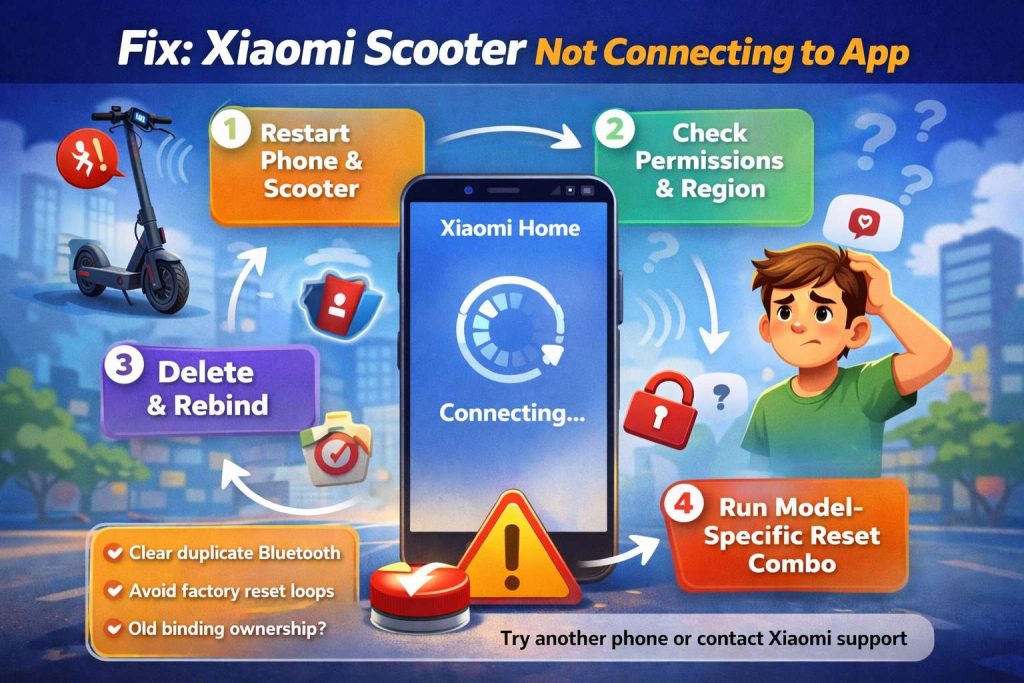
1) Force-close the app and restart both devices
First, close Xiaomi Home fully, not just minimize it.
Next, power off the scooter for 10 to 15 seconds.
Then, reboot your phone.
After that, turn the scooter on again and reopen Xiaomi Home.
This step clears stuck Bluetooth sessions. It is simple, and it solves more cases than people expect.
2) Recheck app permissions one by one
Now open app permissions and verify:
- Bluetooth access
- Nearby devices access on newer Android versions
- location access
- network access
Then test scan again.
Many users skip this and lose hours. A single denied permission can break discovery or final pairing.
3) Confirm your Xiaomi Home region
Next, check app region in settings.
Then set the region that matches your scooter market.
Region mismatch can block proper plugin behavior in Xiaomi Home. So, scanning may work, but bind flow can fail midway.
4) Remove duplicate Bluetooth history
Now open phone Bluetooth settings.
Then forget old scooter entries, if present.
After that, return to Xiaomi Home and scan there, not from generic phone Bluetooth pair screen.
This keeps the handshake inside Xiaomi Home, where account binding works right.
5) Delete the scooter from Xiaomi Home, then add it again
If the scooter appears in the app but won’t connect, do a full re-add:
- open scooter page in Xiaomi Home
- remove or delete device
- confirm deletion
- close app
- reopen app
- add scooter again
This clears stale token data in many cases.
6) Reset the scooter with the right button combo for your model
Now do a reset, but use the combo for your exact model generation.
Then wait for confirmation beep or screen change.
After that, retry binding from Xiaomi Home.
Reset patterns vary by model. So, do not copy a random combo from another scooter.
7) Rebind in this order
Use this order exactly:
- delete old app device entry
- reset scooter
- reopen app
- scan and bind
- finish activation prompts
Order matters. If you swap steps, old binding residue can stay active.
Xiaomi scooter found, but pairing still fails
This case is common. The scooter appears in scan results, yet pairing stops near the end.
First, move away from crowded Bluetooth zones.
Next, disable extra wearables for two minutes.
Then retry scan.
At the same time, check battery level on both phone and scooter. Low power can trigger unstable radio behavior.
Then watch for account prompts. If the app says the device is tied to another account, stop and solve binding ownership first.
How to unpair Xiaomi scooter without the old phone
Many riders ask this after changing phones or buying used scooters.
Case A: You still own the Xiaomi account
First, install Xiaomi Home on the new phone.
Next, sign in with the same Xiaomi account.
Then remove the scooter from that account inside the app.
After that, bind again from scratch.
Case B: You lost the old phone but still have login access
Sign in on another device with the same Xiaomi account.
Then remove the scooter from your device list.
Now bind it again from Xiaomi Home.
Case C: You bought a used scooter tied to another person
In that case, the old owner must remove the scooter from their account first.
Then you can bind it to your own account.
This step blocks many second-hand purchases, so test ownership status before paying.
Bluetooth reset tips that prevent repeat problems
First, keep firmware and app current.
Next, avoid repeated hard resets in a row.
Then, after each reset, let the scooter sit for 20 to 30 seconds before a new pairing attempt.
After that, keep only one phone active during setup.
Then finish all activation prompts in one session.
So, do not exit setup early.
That full flow prevents partial activation states that can cause later lock or speed mode confusion.
Firmware update fails, and app won’t reconnect
Firmware errors can leave the scooter in a weird middle state.
Try this sequence:
- restart phone
- restart scooter
- reconnect near the scooter
- retry update on stable Wi-Fi or data
- keep screen on during update
- avoid switching apps
Then, if update fails again, remove device from app, reset scooter, and bind again before next update try.
Related fixes you may want next
If you ride Segway or Ninebot too, this guide can save time: Segway app not connecting fix and Ninebot binding problems.
And if you track Xiaomi launch news, here is a quick read: Xiaomi Electric Scooter 6 leak just dropped.
Common user mistakes that cause repeat pairing failure
First, users open phone Bluetooth settings and pair there first.
Then Xiaomi Home cannot complete clean account binding.
Next, users skip region checks.
Then app plugin behavior looks broken.
Then users reset scooter without removing old app entry.
So stale data remains.
After that, users test with many phones in one hour.
Then account and Bluetooth cache state gets messy fast.
Stay calm, run one clean sequence, and you will save time.
Friendly troubleshooting checklist you can screenshot
Use this list top to bottom:
- power scooter on
- keep phone close
- enable Bluetooth, location, data
- verify app permissions
- verify app region
- close and reopen app
- reboot scooter and phone
- remove old app device entry
- run model-correct reset
- rebind in Xiaomi Home
- finish activation flow
- test lock and unlock
- test short ride
If pairing still fails after this full path, contact Xiaomi service with your model code, app version, phone model, and a short video of the failure point. That gives support a clear start and cuts back-and-forth.
Short FAQ
Why can’t I connect to my Xiaomi scooter?
Most cases come from permissions, wrong region, stale binding, or a reset done out of order.
Why isn’t my electric scooter connecting to the app after reset?
Reset alone may not clear account binding. Remove the old app device entry, then reset, then bind again.
Can I unpair Xiaomi scooter without the old phone?
Yes. Sign in with the same Xiaomi account on a new phone, then remove the scooter and rebind. For used scooters, old owner unbind is often required.
My scooter appears in scan, but pairing still fails. What now?
Clear permissions, confirm region, remove old entries, reset once, and pair again with only one phone active nearby.